


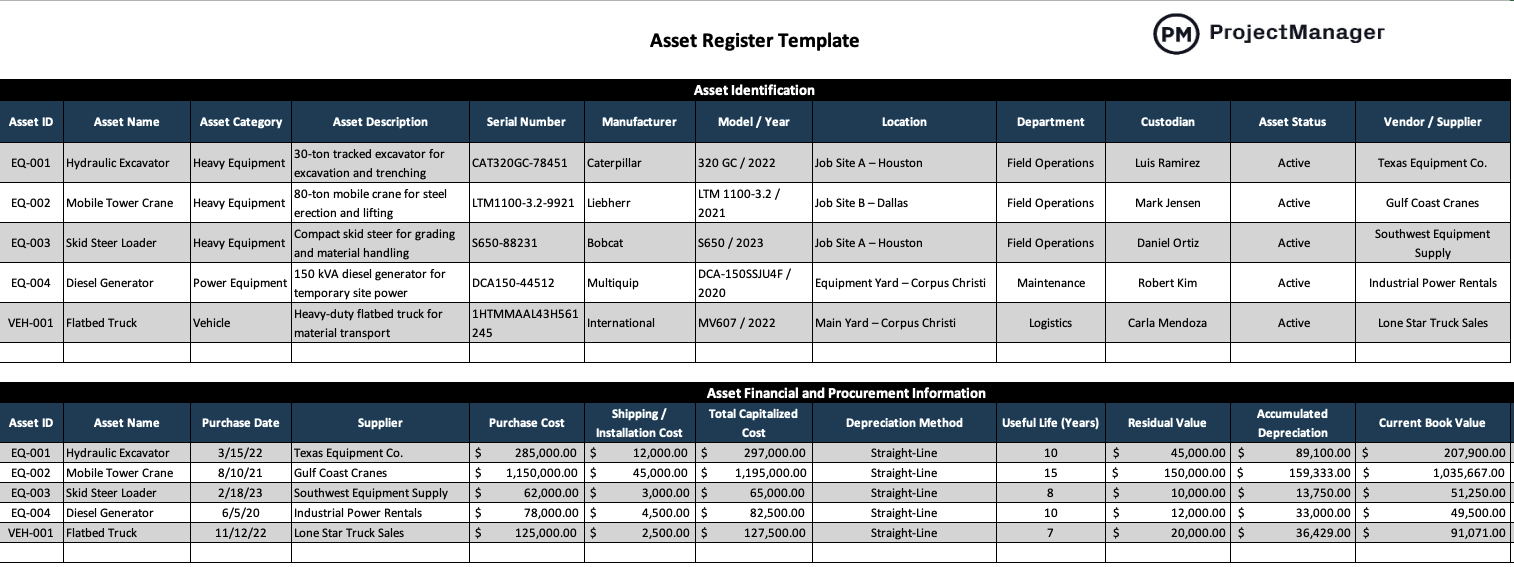
Heavy equipment, production machinery and fleet vehicles represent serious capital, and losing track of them drains profit fast. This asset register template is built specifically for construction and manufacturing businesses that need tighter control over equipment, depreciation and maintenance. If you want clearer visibility and fewer surprises, this asset register template gives you a structured starting point.
Whenever you’re ready to start managing projects, give ProjectManager a try. ProjectManager is an award-winning project management software designed to plan, schedule and track projects from start to finish. Build detailed project schedules, allocate resources, monitor costs and compare estimates against actual performance using a complete set of powerful project management tools. Get started for free today.

Why You Need an Asset Register Template
An asset register is a structured record that lists a company’s physical assets along with key details such as purchase cost, location, depreciation method and condition. In construction and manufacturing, it connects financial data with operational realities like construction sites, production lines and maintenance schedules.
Without structure, equipment tracking turns into scattered spreadsheets, incomplete depreciation schedules and missed inspections. This asset register template standardizes how assets are recorded, updated and reviewed across projects or plant operations. By using a consistent format for asset tracking, maintenance logs and fixed asset reporting, construction and manufacturing teams reduce errors, simplify audits and make smarter capital planning decisions.

When To Use a Asset Register Template
An asset register template should be created as soon as a business acquires capital assets beyond basic tools, ideally when the first major equipment purchase hits the balance sheet. From that point forward, it becomes a living document updated whenever assets are purchased, relocated, serviced or disposed of.
Construction companies often revise entries as equipment moves between construction sites, while manufacturing updates may center on production lines and plant upgrades. The asset register template remains active indefinitely; instead of replacing it, companies maintain continuity and only archive it if ownership structures or accounting systems fundamentally change.
Who Should Use this Free Asset Register Template?
Mid-sized general contractors, heavy civil firms and specialty subcontractors managing multiple job sites benefit most from this asset register template. Companies that own fleets of excavators, cranes, generators and trucks need structured asset tracking to control depreciation, maintenance schedules and equipment availability. Any construction business juggling projects, field crews and capital equipment can use this asset register template to stay organized.
- Construction project managers who need visibility into equipment availability, job site assignments and downtime before building a reliable project timeline.
- Equipment or fleet managers responsible for tracking heavy machinery, coordinating preventive maintenance and reducing unplanned breakdowns across multiple project sites.
- Controllers or accounting managers overseeing fixed asset registers, depreciation schedules and balance sheet accuracy for audit and tax reporting.
- Operations managers balancing resource allocation across simultaneous construction projects and monitoring lifecycle cost of capital assets.
- Safety or compliance managers ensuring inspections, certifications and equipment documentation are current and accessible during regulatory reviews.
Manufacturers operating a single plant or multiple facilities with production machinery, material handling equipment and support systems can also rely on this asset register template. Businesses investing in CNC machines, compressors, forklifts and automated lines use structured asset management to align maintenance logs, depreciation reporting and capital planning with daily production targets.
- Plant managers monitoring equipment uptime, coordinating preventive maintenance and protecting production capacity across manufacturing operations.
- Maintenance supervisors tracking service intervals, spare parts usage and operating hours to extend the useful life of critical machinery.
- Financial controllers maintaining an accurate fixed asset register, calculating accumulated depreciation and preparing reports for external auditors.
- Operations directors planning capital expenditures and evaluating replacement schedules based on lifecycle cost and equipment performance data.
- IT or systems managers integrating asset tracking data with ERP or CMMS platforms to support enterprise-wide asset management reporting.
How to Use ProjectManager’s Asset Register Template for Excel
Once you download the asset register template, the goal is simple: capture accurate data from day one and keep it current. Each section builds on the last, connecting equipment details with financial tracking, maintenance schedules and compliance records. Start with identification, then layer in cost, service and inspection information to create a complete asset management system.
Asset Identification
This section of the asset register template establishes a clear identity for every piece of equipment your business owns. In construction and manufacturing environments where assets move between job sites or plant areas, precise identification prevents confusion, double-booking and loss. By recording consistent details here, you create a reliable foundation for asset tracking, maintenance planning and fixed asset reporting across the organization.

- Asset ID: A unique code assigned to each asset for tracking, reporting and cross-referencing in your fixed asset register.
- Asset Name: The commonly used name of the equipment, such as hydraulic excavator or flatbed truck.
- Asset Category: Classification of the asset, such as heavy equipment, vehicle or power equipment, for reporting and sorting.
- Asset Description: Brief summary of size, capacity or intended use to distinguish similar assets.
- Serial Number: Manufacturer-issued identification number used for warranty, insurance and service records.
- Manufacturer: Company that produced the asset, useful for maintenance coordination and parts sourcing.
- Model / Year: Specific model and production year, important for valuation and lifecycle planning.
- Location: Current job site, yard or plant area where the asset is assigned.
- Department: Business unit responsible for the asset, such as field operations or maintenance.
- Custodian: Individual accountable for day-to-day oversight and condition of the equipment.
- Asset Status: Indicates whether the asset is active, under repair, idle or retired.
- Vendor / Supplier: Company that sold the asset, helpful for procurement history and warranty claims.
Asset Financial and Procurement Information
Money is tied up in every excavator, crane and truck you own, which is why this section of the asset register template focuses on financial control. Here, construction and manufacturing teams connect purchase data with depreciation schedules and insurance coverage. By consolidating capitalized cost, useful life and current book value, the asset register template supports fixed asset reporting, audit preparation and long-term capital planning.

- Asset ID: Links financial data to the correct record in your asset register template for accurate tracking.
- Asset Name: Identifies the equipment associated with each capital expenditure entry.
- Purchase Date: Records when the asset was acquired for depreciation and warranty tracking.
- Supplier: Vendor from whom the asset was purchased, useful for procurement history and contract reference.
- Purchase Cost: Base price paid for the asset before additional capitalized expenses.
- Shipping / Installation Cost: Additional costs required to place the asset into service.
- Total Capitalized Cost: Combined amount recorded on the balance sheet as a fixed asset.
- Depreciation Method: Method used to allocate asset cost over its useful life, such as straight-line.
- Useful Life (Years): Estimated operational lifespan used for depreciation calculations.
- Residual Value: Expected value of the asset at the end of its useful life.
- Accumulated Depreciation: Total depreciation recorded to date against the asset.
- Current Book Value: Remaining value of the asset after subtracting accumulated depreciation.
- Warranty Expiry Date: Date when manufacturer warranty coverage ends.
- Insurance Policy Number: Policy reference number covering the asset for loss or damage.
Maintenance & Service Tracking
Breakdowns cost more than repair invoices; they disrupt production and construction schedules, delay deliveries and strain crews. This section of the asset register template captures preventive maintenance data alongside downtime and operating hours, giving construction and manufacturing teams real control over equipment performance. By tracking service intervals and condition ratings in one place, the asset register template supports proactive maintenance planning instead of reactive firefighting.

- Asset ID: Connects maintenance activity to the correct asset record in your asset register template.
- Asset Name: Identifies the specific equipment receiving service or inspection.
- Maintenance Schedule Type: Indicates whether service is hours-based, date-based or mileage-based.
- Last Service Date: Records when the most recent maintenance was completed.
- Next Service Due: Shows the upcoming maintenance deadline based on schedule or usage.
- Service Interval: Defines the frequency of maintenance, such as every 500 operating hours or six months.
- Meter Reading / Operating Hours: Captures current usage to align service timing with real workload.
- Maintenance Vendor: Lists the company or technician responsible for servicing the asset.
- Maintenance Cost: Tracks expenses associated with each service event for lifecycle cost analysis.
- Downtime Hours: Measures how long the asset was unavailable due to maintenance or repair.
- Condition Rating (Good/Fair/Poor): Provides a quick assessment of equipment health for asset management decisions.
Compliance and Safety
Regulators do not care how busy your project schedule or production line is; inspections still happen. This section of the asset register template centralizes inspection dates, certification expirations and safety documentation so nothing slips through the cracks. By aligning compliance tracking with asset management, the asset register template helps construction and manufacturing teams reduce risk, avoid penalties and maintain safe operations.

- Asset ID: Ties inspection and compliance records to the correct entry in the asset register template.
- Asset Name: Identifies the specific piece of equipment subject to inspection or certification.
- Inspection Required (Yes/No): Indicates whether the asset is subject to regulatory or internal safety inspections.
- Last Inspection Date: Records when the most recent safety or compliance inspection was completed.
- Next Inspection Due: Highlights the upcoming inspection deadline to support proactive compliance management.
- Certification Expiry: Shows when required certifications or approvals lapse and must be renewed.
- Safety Notes: Documents inspection findings, corrective actions taken and compliance observations.
ProjectManager Is an Award-Winning Project Management Software
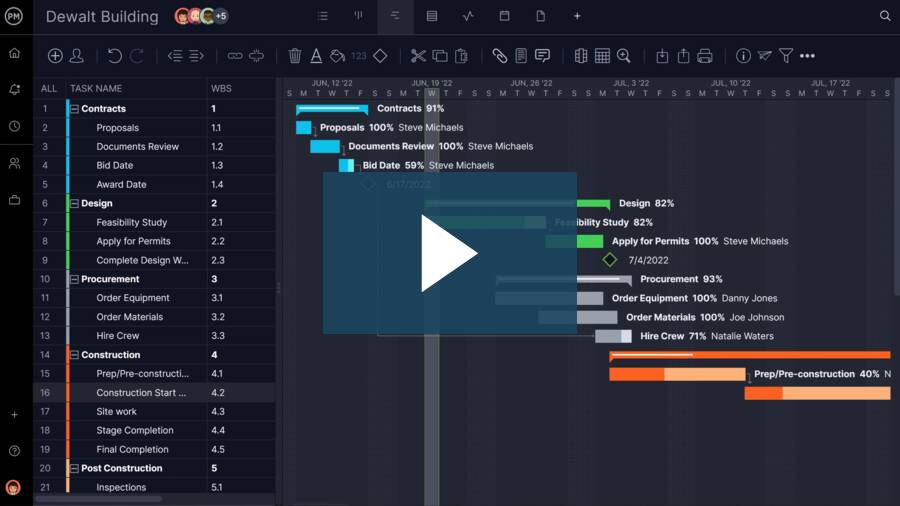
ProjectManager offers robust project management features such as Gantt charts, task lists, workload management charts, timesheets and real-time dashboards and reports, all of which are ideal for construction and manufacturing projects. In addition to that, it’s also equipped with AI project insights, online team collaboration features and unlimited file storage that further help project managers ensure nothing falls through the cracks. Watch the video to learn more!
Free Related Templates
We’ve created dozens of free project management templates for construction and manufacturing. Here are some of them.
Gantt Chart Template
A Gantt chart template helps project managers map tasks, durations and milestones on a clear project timeline. By combining a task list with a visual schedule, it makes sequencing work, spotting bottlenecks and adjusting deadlines significantly easier during project planning and execution.
Material List Template
A material list template organizes materials, quantities, unit costs and supplier details in one structured sheet. It supports procurement planning, cost control and delivery coordination, helping construction and manufacturing teams align purchasing decisions with project schedules and production requirements.
Inventory Template
An inventory template tracks item IDs, stock levels, unit costs and reorder thresholds across warehouses or storage areas. By monitoring quantities on hand and reorder timing, it helps businesses protect production flow, avoid stockouts and maintain accurate inventory valuation.
ProjectManager is award-winning software for managing any project. Our collaborative platform connects your teams and gives you access to the manufacturing floor no matter where you are or what time it is. Get started with ProjectManager today for free.