


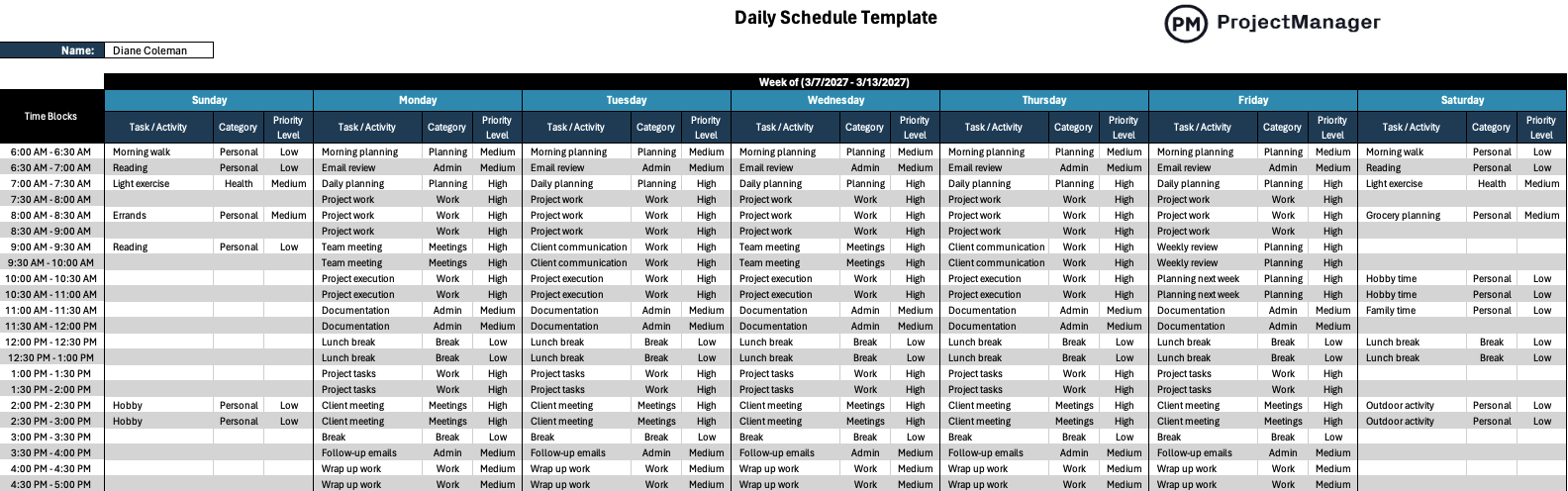
Busy days rarely fall apart because people lack motivation—they fall apart because time disappears into unplanned tasks. A structured daily schedule template helps bring order to that chaos by giving every activity a place in the day. Whether you’re organizing project work, personal responsibilities or weekly priorities, the daily schedule template below provides a clear, repeatable way to plan time and stay focused.
Whenever you’re ready to start managing projects, give ProjectManager a try. ProjectManager is an award-winning project management software designed to plan, schedule and track projects from start to finish. Build detailed project schedules, allocate resources, monitor costs and compare estimates against actual performance using a complete set of powerful project management tools. Get started for free today.

Why You Need a Daily Schedule Template
A well-designed daily schedule template for Excel helps people break their day into manageable time blocks so personal activities, project work and routine responsibilities can all fit into a clear plan. Each activity can be categorized, assigned a priority level and aligned with weekly goals. Because the format repeats across the entire week, users can manage time consistently and replicate productive schedules week after week.

- Name: Identifies the person responsible for the schedule, which helps personalize the daily schedule template and ensures ownership of tasks, priorities and planning decisions throughout the week.
- Week of: Defines the specific week being planned, allowing users to clearly frame their schedule planning horizon and maintain organized weekly time management records.
- Time blocks: Break the day into structured increments that help users allocate time deliberately instead of reacting to tasks as they appear.
- Task / Activity: Lists the specific actions planned within each time block, helping users define what work, personal task or project activity must be completed.
- Category: Groups tasks into meaningful classifications such as work, planning, meetings, personal activities or administrative responsibilities for better schedule visibility.
- Priority Level: Allows users to identify which tasks require immediate attention and which activities can be completed with lower urgency throughout the day.
When to Use a Daily Schedule Template
This daily schedule template can be used by anyone who wants a structured way to plan time.
- Project management: Project managers and team leaders use a daily schedule template to plan meetings, track project tasks, organize documentation work and allocate focused time for project execution within a broader project timeline.
- Personal task management: Individuals often rely on a daily schedule template to organize errands, health routines, hobbies and household responsibilities while keeping their daily priorities visible and manageable.
- Students: Students can use a daily schedule template to balance study sessions, classes, assignments, reading time and extracurricular activities without losing track of academic priorities.
- Freelancers: Independent professionals use a daily schedule template to organize client work, administrative tasks, meetings and personal responsibilities while maintaining consistent productivity.
- Small business owners: Entrepreneurs frequently use a daily schedule template to divide time between operations, planning, customer communication and business development activities.
- Remote workers: Professionals working from home use a daily schedule template to maintain structure, manage focus blocks and prevent work tasks from blending into personal time.
One of the biggest advantages of this daily schedule template is its flexibility across time. It can be started at any point in the year and reused indefinitely because the layout simply requires defining the week being planned. At the top of the template, users can specify the planning period using a field such as “Week of (3/7/2027 – 3/13/2027),” allowing schedules to be recreated for every upcoming week.
How to Use ProjectManager’s Daily Schedule Template
Getting organized with a daily schedule template becomes much easier when the structure is already built for you. ProjectManager’s daily schedule template for Excel allows users to plan their week by defining time blocks, assigning tasks and setting priorities so work, meetings and personal activities stay aligned with daily and weekly goals.
- Step 1. Enter your name and define the planning week: Begin by filling out the name field and specifying the “Week of” date range at the top of the daily schedule template. This establishes the planning period for the schedule and makes it easier to archive previous weeks or create a consistent weekly planning routine.
- Step 2. Review the time block structure: The daily schedule template organizes each day into predefined time blocks that represent short increments of time. Scan the rows to understand how the day is divided so you can realistically assign tasks without overcrowding your schedule or creating unrealistic workloads.
- Step 3. List tasks and activities for each time block: Start filling in the Task / Activity columns across the week. Add work tasks, meetings, project execution time, personal activities or administrative responsibilities depending on what needs to happen during that period.
- Step 4. Assign categories to each activity: Use the Category column to group similar types of work such as planning, meetings, project work, personal activities or administrative tasks. Categorizing activities helps you visualize how your time is distributed throughout the week.
- Step 5. Set priority levels for each task: Next, define the Priority Level for every activity you add to the daily schedule template. Marking tasks as high, medium or low priority helps you focus attention on the most important work if the day becomes busy or unexpected tasks appear.
- Step 6. Review the full weekly schedule: Once all tasks are entered, scan the entire daily schedule template from Monday through Sunday to ensure the workload is balanced. Look for gaps, overloaded periods or opportunities to group similar tasks together for better productivity.
- Step 7. Adjust and repeat the process each week: After completing the week, you can duplicate the daily schedule template and update the “Week of” field to plan the next schedule cycle. Because the format stays consistent, weekly planning becomes faster and easier over time.
ProjectManager Is an Award-Winning Project Management Software
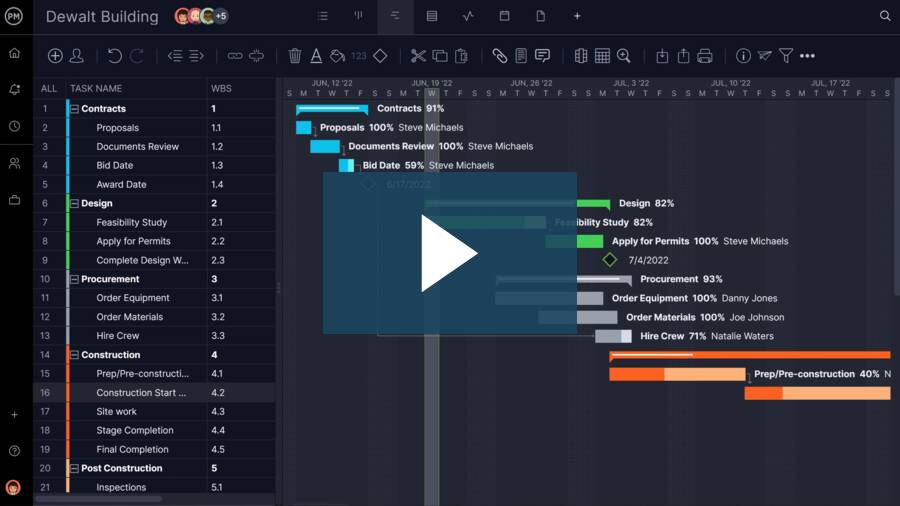
ProjectManager offers robust project management features such as Gantt charts, task lists, workload management charts, timesheets and real-time dashboards and reports. In addition to that, it’s also equipped with AI project insights, online team collaboration features and unlimited file storage that further help project managers ensure nothing falls through the cracks. Watch the video to learn more!
Free Related Templates
We’ve created over 100 free project management templates for Excel, Word and Google Sheets that can help with both personal and professional projects. Here are some that can be used in conjunction with this daily schedule template.
Daily Task Tracker Template for Excel
This daily task tracker template for Excel organizes tasks by day and time so users can plan activities, track deliverables and monitor task completion throughout the week from a single structured worksheet.
Daily Report Template
This daily report template for Excel helps teams document completed, ongoing and upcoming work while tracking task priorities, dates, outcomes and responsibilities to maintain visibility into daily progress and project activities.
Task Tracker Dashboard
This Excel task tracker dashboard template visualizes task priorities, assignments, statuses and deadlines through automated charts and graphs, helping teams monitor project workload, progress and performance from a single dynamic dashboard.
If you need a tool to help you manage personal or professional projects, signup for our software now at ProjectManager. Our online software helps project managers plan, track and oversee projects as they unfold. Sign up for a free 30-day trial today!