


Agile teams move fast, but clarity can disappear just as quickly when ideas live in scattered notes and hallway conversations. A well-structured user story template brings discipline to sprint planning, backlog refinement and release execution without slowing anyone down. Keep reading to see how this free user story template helps teams align around value and ship confidently.
ProjectManager is an award-winning project portfolio management software that offers advanced planning, scheduling and tracking tools for software development and IT teams, allowing them to create visual roadmaps for their delivery plans, allocate resources, track costs and manage waterfall and agile workflows. Additionally, ProjectManager integrates with Jira, Azure Devops and features an open API that facilitates integration with other software development tools. Get started for free today.

Why You Need a User Story Template
The most common use case for a user story template is documenting feature requests during backlog refinement so software development teams stay aligned before sprint planning. Instead of vague tickets, teams capture context, scope, acceptance criteria and business value in one structured format, reducing rework and ensuring development starts with shared expectations.
- Use a user story template to standardize feature documentation across multiple agile teams and product lines.
- Apply a user story template during sprint planning to clarify scope boundaries and prevent mid-sprint confusion.
- Leverage a user story template to connect roadmap initiatives directly to measurable business value outcomes.
- Adopt a user story template to improve collaboration between product managers, developers and QA analysts.
- Rely on a user story template to create testable acceptance criteria that streamline quality assurance validation.

Who Should Use This Free User Story Template?
Digital product managers working inside agile frameworks are the primary users of this free user story template. They own the product backlog, define priorities, align stories with the product roadmap and translate stakeholder requests into structured requirements for software development. A user story template gives them a consistent way to prepare stories before sprint commitment.
Although most commonly associated with software development and IT teams, this user story template is not limited to engineering environments. Any team delivering iterative digital product improvements—whether SaaS platforms, internal enterprise systems, mobile applications or digital transformation initiatives—can use a user story template to structure backlog items, clarify scope and support sprint planning.
- Agile software development teams building web applications, SaaS platforms or mobile products.
- IT departments delivering internal systems, workflow automation or infrastructure improvements.
- Product development teams managing feature releases aligned to a structured product roadmap.
- Digital transformation teams modernizing legacy systems through iterative sprint-based delivery.
- Startup teams validating new product features through rapid backlog refinement cycles.
- Enterprise technology teams coordinating cross-functional releases across multiple product backlogs.
- UX and engineering teams collaborating on user-centered feature implementation.
- QA-focused teams requiring structured acceptance criteria for sprint testing cycles.
- DevOps-enabled teams deploying incremental improvements within continuous delivery pipelines.
- Cross-functional agile teams running Scrum, Kanban or hybrid sprint planning frameworks.
How to Use ProjectManager’s User Story Template for Word
This user story template is built to guide a feature from initial idea to post-release review. Each section supports backlog refinement, sprint planning, acceptance testing and performance validation, ensuring nothing critical is overlooked during development. To use it, follow these steps.
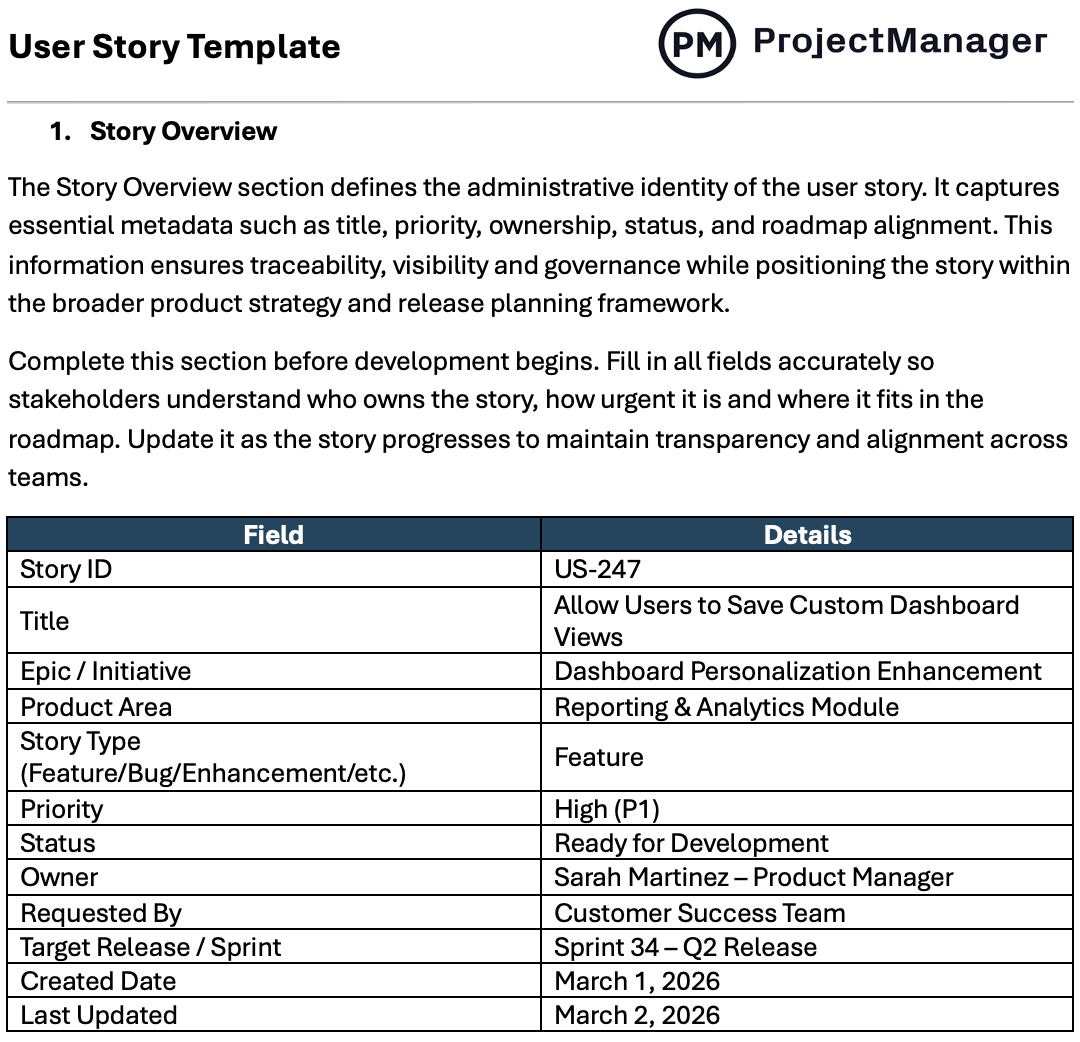
1. Story Overview
At the top of the user story template, the story overview establishes identity and ownership. It captures metadata such as title, priority, status and roadmap alignment so teams can trace the story within the product backlog and understand exactly where it fits in the release plan.

Complete this section before development begins. Fill in all fields accurately so stakeholders understand who owns the story, how urgent it is and where it fits in the roadmap. Update it as the story progresses to maintain transparency and alignment across teams.
2. User Story Statement
Written from the user’s perspective, the user story statement clarifies intent before development begins. By following the “As a / I want / So that” structure, this part of the user story template centers the conversation on outcomes and value rather than jumping prematurely into technical solutions.

Write this statement clearly and avoid technical language. Focus on the user’s goal and the benefit delivered. If the statement cannot be understood by both business and engineering stakeholders, simplify it until the intended value is unmistakable.
3. User and Context
Before anyone writes code, teams need clarity on who the feature serves and under what conditions it will be used. This section of the user story template documents personas, goals, assumptions and dependencies so design and engineering decisions reflect real-world behavior.

Be specific about the user segment and their working environment. Document relevant assumptions and system dependencies early. Clear context reduces ambiguity and helps teams build solutions that reflect actual user behavior rather than theoretical use cases.
4. Problem and Rationale
Every item in the product backlog should exist for a reason. The problem and rationale portion of the user story template connects the work to measurable impact by outlining the current gap, the frustration or inefficiency involved and the expected business value.

Describe the problem using evidence such as data, feedback or observed inefficiencies. Clearly connect the proposed improvement to business or user outcomes. Avoid vague language and focus on the reason this story deserves prioritization.
5. Scope Definition
Clear boundaries protect sprint commitments. Within this section of the user story template, teams define what is in scope, what is explicitly excluded and which constraints may affect delivery, reducing ambiguity and limiting scope creep during execution.

List all in-scope items clearly and explicitly document what is out of scope. Include technical, legal or performance constraints that may influence delivery. If something is not written here, it should not be assumed to be part of the story.
6. Functional Requirements
Once intent is clear, expected system behavior must be specified. The functional requirements area of the user story template translates user needs into concrete, testable statements that engineering can implement and QA can validate without interpretation gaps.

Write requirements as clear, verifiable statements. Each requirement should describe observable system behavior and avoid ambiguity. If a requirement cannot be tested, it should be rewritten. Prioritize them when necessary to guide implementation decisions.
7. Business Rules
Beyond features themselves, certain policies and decision logic shape how the solution behaves. This part of the user story template captures validation rules, limits and conditional behaviors to ensure compliance and consistency across the product.

Document validation logic, limits, thresholds and conditional behaviors that must be enforced. Be precise and avoid general statements. If a rule affects user permissions, calculations or restrictions, it belongs here rather than in functional requirements.
8. Data & Integration Requirements
Features rarely operate in isolation. The data and integration requirements section of the user story template documents inputs, outputs, storage expectations and API dependencies so architecture and performance considerations are addressed early.

Specify required data fields, sources and persistence expectations. Identify integrations, APIs or external services involved. Clarify validation, security and retention considerations so engineering teams understand how the feature fits into the broader system ecosystem.
9. Roles & Permissions
Access control matters as much as functionality. Here, the user story template specifies which roles can view, create, edit or delete related elements, helping teams prevent authorization issues and security gaps during development.
List each relevant user role and specify allowed actions clearly. Document any restrictions, exceptions or elevated permissions. If access behavior varies by role, capture it here to prevent confusion during development and avoid unintended security or authorization issues.
10. Acceptance Criteria (Given / When / Then)
Completion should never be subjective. The acceptance criteria portion of the user story template uses a Given / When / Then format to define observable scenarios, making it clear when the story satisfies its intended behavior.

Write criteria that describe specific scenarios, including happy paths, edge cases and error states. Each statement should be testable and unambiguous. If QA cannot verify it objectively, refine the wording until the expected behavior is measurable and clear.
11. UX & UI Requirements
How the feature looks and feels directly influences adoption. This section of the user story template outlines interaction flows, interface elements and usability expectations to align design decisions with documented user goals.
Document user flows, interface elements, states and design references. Specify loading, empty and error states where relevant. Link to approved mockups when available. This section should guide implementation without leaving visual or interaction details open to interpretation.
12. Non-Functional Requirements
Performance, scalability and security often determine whether a feature succeeds long term. The Non-Functional Requirements area of the user story template sets measurable standards for reliability, compliance and accessibility.
Specify measurable standards such as response times, availability thresholds or compliance requirements. Avoid vague statements like “fast” or “secure.” These requirements should be concrete enough to validate through testing and monitoring during development and after release.
13. Analytics & Success Metrics
Shipping the feature is only part of the job. In this section, the user story template defines key performance indicators and tracking events so teams can measure adoption, impact and alignment with product objectives.
Identify clear, measurable metrics aligned with the story’s objective. Define baselines and target outcomes when possible. Specify tracking events or instrumentation requirements so analytics teams can monitor adoption, performance and business impact after deployment.
14. QA & Testing Notes
Before release, validation must be deliberate. The QA and Testing Notes section of the user story template captures test scenarios, regression risks and environment considerations to ensure stable deployment.
List critical test cases, edge conditions and regression risks. Identify required test data and affected environments. Use this section to align product and QA teams on validation scope so nothing essential is overlooked before production release.
15. Rollout & Operational Plan
Releasing a feature requires more than flipping a switch. This portion of the user story template details rollout strategy, monitoring requirements and contingency planning to support a controlled production launch.
Describe whether the release will be phased, feature-flagged or immediate. Identify monitoring needs, support preparation and rollback procedures. This section ensures operational readiness and reduces risk during and after deployment.
16. Definition of Ready (DoR)
Not every backlog item is prepared for sprint commitment. The definition of ready within the user story template establishes minimum criteria so development begins only when scope, dependencies and acceptance criteria are fully clarified.

Use this section as a quality gate before sprint commitment. Confirm acceptance criteria, scope boundaries, dependencies and designs are finalized. If key elements are missing or unclear, the story should not enter active development.
17. Definition of Done (DoD)
Finishing means more than writing code. The definition of done in the user story template confirms that testing, documentation, performance validation and stakeholder approval are complete before the story is officially closed.

List objective completion criteria such as testing, documentation, security review and stakeholder approval. A story is only complete when every item is satisfied. This prevents premature closure and maintains product quality across teams.
ProjectManager Can Help with IT & Software Development Projects
ProjectManager is an award-winning project portfolio management software equipped with powerful features for IT and software development teams, such as Gantt chart roadmaps to manage delivery plans and project portfolios, dashboards for monitoring resource utilization, project costs and progress in real time and kanban boards for agile sprints and iterative planning.
ProjectManager also offers robust resource management features such as workload charts to balance teams’ workloads and timesheets for detailed time tracking. On top of that, ProjectManager integrates with Jira and Azure DevOps and has an open API so that organizations can integrate its powerful project portfolio management features with their favorite tools. Watch the video below to learn more.